Pipeline Customization
Copy Article URL
Use this guide to configure job-specific feedback forms, status stages, and resume match weights so each role is evaluated in a way that fits the hiring workflow you actually run.
What Customize Job Settings controls in Ovii
The Customize panel is Ovii’s job-level operating layer. It does not create the role itself; it tells the system how that role will be evaluated after the job is live. In the current product, that layer is split into three controls: interview feedback, candidate status pipeline, and resume match scoring.
That separation is intentional. These three controls solve different governance problems. Feedback forms standardize interviewer evidence. Pipeline stages define how the team moves candidates through the process. Resume match scoring defines what the system should value when it ranks applicants against this specific job.
Treat this area as a calibration surface rather than an optional polish step. The better it is configured before activity starts, the cleaner the hiring process becomes later.
- Customize Interview Feedback Form: Use this when the default evaluation structure is too generic for the role and the interview team needs a more specific rubric.
- Status Pipeline: Use this when the default candidate stages do not match the checkpoints, handoffs, or approvals your team actually uses.
- Resume Match Score: Use this when the default resume-ranking weights do not reflect what matters most for the role, such as heavier skill emphasis or greater importance on domain fit.
Interview feedback form customization and status-pipeline customization are feature-controlled paths in the backend. If a save action is blocked or unavailable, review your company feature access before troubleshooting the job itself.
Decide when to customize and when to keep the defaults
The defaults exist for a reason. Ovii starts each job from a reusable baseline so recruiters do not have to rebuild structure from scratch every time. In enterprise hiring, that is usually the right default because it keeps teams aligned and preserves consistency across similar roles.
Customize only when the role genuinely needs a different evaluation model. If every recruiter edits every job, the process becomes difficult to compare, hard to audit, and expensive to maintain. If nobody customizes when they should, the workflow stays neat but the role may be evaluated against the wrong criteria.
A practical rule is this: keep the default if the job follows the company’s standard hiring path; customize if the role needs materially different evidence, stage flow, or candidate-ranking logic.
- Keep the defaults when: the role follows the standard hiring motion for the function, the default interview rubric is already good enough, and the normal stage sequence works without forcing awkward workarounds.
- Customize early when: the role has specialist interviews, unusual screening criteria, different stage ordering, or a resume profile that should be scored differently from the company default.
- Avoid late customization when: candidates have already been moved through stages or interviewers have already started submitting feedback. At that point, stability matters more than elegance.
Customize Interview Feedback Form
The feedback-form editor exists to make interviewer evidence more role-specific. Ovii begins with a default form built from industry-standard criteria, which is a sensible baseline for common roles. The problem is that a default form cannot fully capture what makes one hiring process different from another.
For a deeply technical role, the team may need separate sections for algorithmic depth, system-design tradeoffs, domain judgment, or stakeholder communication. For a sales or operations role, those sections may be the wrong lens entirely. Customizing the feedback form lets the recruiter define what good evidence should look like before interviewers start scoring candidates.
This matters more than teams usually admit. A hiring process becomes inconsistent when interviewers are forced to improvise their own criteria. A strong custom form gives the panel a shared language for evaluation and makes debriefs easier because everyone is rating against the same frame.
- Start from the default template first: Use the built-in form as your quality floor. If it already covers the role well, leave it alone. Customize only where the role needs sharper or more specialized evaluation categories.
- Name sections as evaluation lenses, not interview rounds: Titles such as Technical Skills & Problem Solving, Domain Knowledge, or Executive Communication are more useful than vague section names because they tell interviewers exactly what to judge.
- Treat the criteria field as guidance for interviewers: Each comma-separated criterion becomes part of the evaluation frame. Use concrete skill or behavior signals, not broad phrases that every interviewer will interpret differently.
- Preserve comment space intentionally: Ovii keeps comments alongside the structured criteria because written evidence is still necessary when the panel needs to justify a strong hire, a no-hire, or a borderline decision.
Replace the default rubric only where the role needs sharper evaluation criteria
Review the default-form banner first, then add or edit evaluation sections to reflect the evidence this job really needs. Use section titles for major competency areas and list the supporting criteria in plain recruiter language so interviewers can score consistently. Save the custom form only after the rubric reads like the panel’s actual debrief framework.
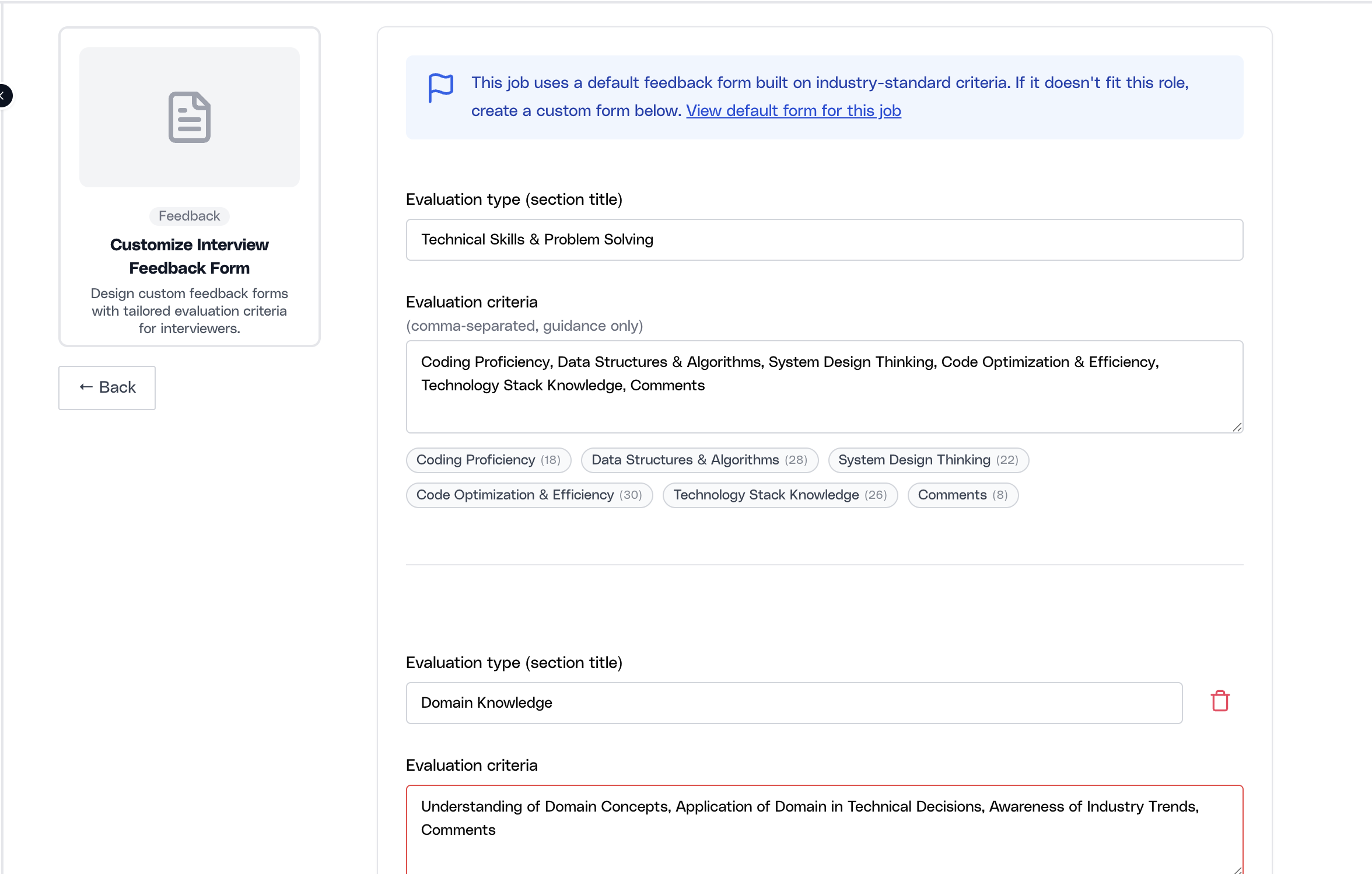
The feedback template is resolved with job-level priority first, then category-level fallback. In practice, that means a custom form overrides the default only for this job, while unchanged jobs can continue to use the shared company or category baseline.
Once actual interview feedback has been submitted for the job, template edits can be locked. That guardrail exists so the team does not change the scoring rubric after candidate evaluations have already started.
Customize Status Pipeline
The status pipeline is the operational map of the job. It controls how candidates move through the workflow and which stage names the team sees in candidate management, reporting, downstream actions, and interview coordination.
This is why stage labels are not cosmetic. A poor pipeline creates handoff confusion, bad reporting, and weak automation logic. A good one mirrors the real decision points of the hiring process without adding unnecessary ceremony.
Ovii seeds each job from the company’s default pipeline so recruiters can start from a stable structure. From there, you can rename stages, reorder them, activate or deactivate them, and add new ones where the workflow truly needs additional checkpoints.
- Use stages for decisions, not activities: A stage should mark a meaningful checkpoint in the hiring journey. If a stage does not change ownership, candidate status, or decision quality, it may not need to exist.
- Keep ordering faithful to the real process: The pipeline should reflect the order in which the business actually evaluates candidates. Teams lose trust in the system when the tool says one thing and the real process happens elsewhere.
- Use Active only for live stages: Inactive stages are useful for removing unused steps without destroying the whole design, but only before the job becomes operational enough that candidates depend on the existing structure.
- Treat protected stages as system-critical: Stages such as Assessment and Video Screen are protected in the UI because other product capabilities depend on them. They are not ordinary labels that should be removed casually.
Align the stage order to the real hiring path before candidates are flowing through it
Start from the default pipeline, then reorder, rename, activate, or add stages so the job reflects the true sequence of evaluation. Keep the set as small as possible while still representing the real checkpoints. Save only after the pipeline is accurate enough for reporting, panel coordination, and candidate progression.
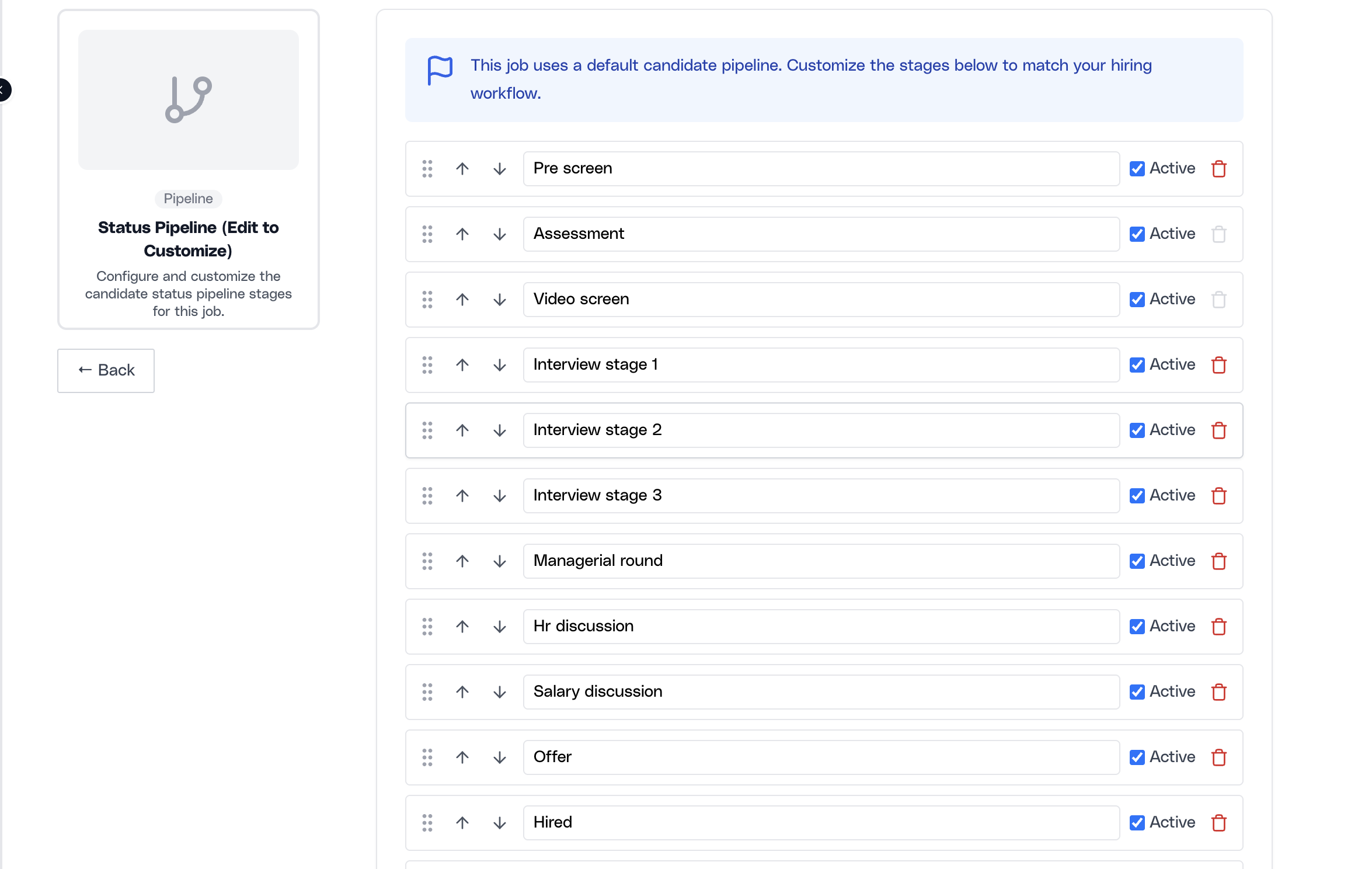
The frontend warns more aggressively once candidates are already active in the workflow. At that point Ovii allows safer changes, such as adding new stages, while preventing destructive edits like deleting or deactivating stages that already affect live movement.
The backend also resets the approval state when the pipeline is replaced and then re-confirms it on save. This is important because other job-level features read the current approved pipeline, not an outdated draft.
Assessment invitations and panel-assignment flows depend on the pipeline being confirmed. In practical terms, pipeline setup should be treated as a prerequisite for the later interview workflow, not as an afterthought.
Customize Resume Match Score
Resume Match Score exists to make resume ranking job-specific. Without it, every job would inherit the same weighting logic even when the role clearly values different signals. That is a poor fit for enterprise hiring because a senior niche role, an early-career volume role, and a domain-heavy leadership role should not all be scored the same way.
Ovii solves that by exposing the scoring weights directly. The recruiter can decide how much the system should care about experience match, skill match, education match, certifications, domain relevance, and notice-period alignment for this one job.
The key idea is simple: weighting is how you tell the system what good fit means. If the role is skill-heavy, push more weight into skills. If domain familiarity is crucial, move weight into domain relevance. If immediate availability matters, allocate meaningful weight to notice period. That is how the ranking engine becomes operationally useful instead of merely mathematical.
- Mandatory criteria define the scoring floor: Experience, skills, and education begin as the default foundation because they are the broadest predictors of relevance across most roles.
- Optional criteria are deliberate trade-offs: Certifications, domain relevance, and notice period only matter if you are willing to take weight away from the mandatory buckets. That forces the recruiter to decide what truly deserves more influence.
- The total must remain at 100%: This prevents hidden over-weighting and makes the ranking model auditable. If everything is important, nothing is actually prioritized.
- Reset is not cosmetic: Resetting removes the custom job configuration and returns the role to the system defaults. Use it when experimentation has made the scorecard harder to defend than the baseline.
Use weights to define fit before you review a high volume of resumes
Read the total-weight indicator first, then adjust the sliders so the configuration reflects the actual hiring logic of the job. Keep the model simple enough that another recruiter or hiring manager could explain why one candidate ranked above another. Save the configuration only when the weight distribution matches the business priorities of this role.
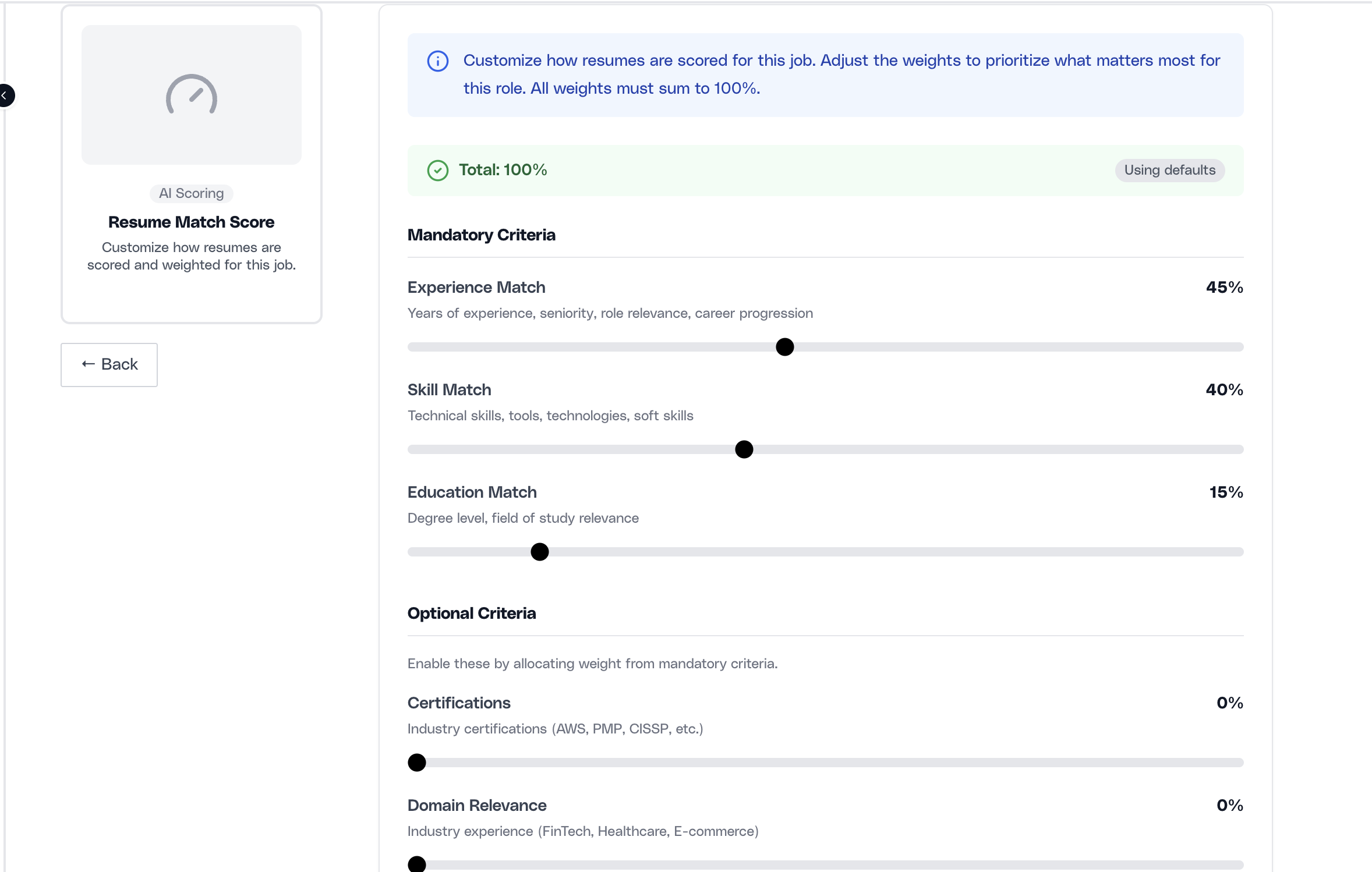
The current defaults are 45% for experience match, 40% for skill match, and 15% for education match, with the optional criteria starting at 0. That is a good general baseline, but it should not be treated as universally correct for every job.
Scoring customization is saved at the job level. Changing these weights affects how this job evaluates candidates; it does not rewrite the scoring logic for every other role in the company.
Operating guardrails for enterprise hiring teams
The best way to use job customization is to treat it like configuration management. Make the decisions early, document the rationale in the hiring team, and avoid unnecessary midstream edits once real candidate activity begins.
In enterprise environments, the goal is not just to make one job look neat. The goal is to make interviewer evidence, candidate progression, and resume ranking defensible across recruiters, hiring managers, and approvers. That only happens when the configuration is stable enough to trust.
- Customize before scale starts: Ideally, finish feedback, pipeline, and scoring decisions before the job is widely promoted or interviewers are activated.
- Use custom logic to improve clarity, not complexity: Every additional section, stage, or scoring lever should make the process easier to reason about. If it adds noise, it is probably not helping.
- Keep recruiter and hiring-manager alignment explicit: If the recruiter customizes the workflow but the hiring manager still evaluates candidates differently, the tool and the process will drift apart immediately.
- Prefer controlled change over constant tweaking: A stable, slightly imperfect workflow is usually better than a highly customized process that changes every time the team gets new feedback.