Interview Management
Copy Article URL
Use the feedback module to turn interviewer judgment into a structured hiring record. Ovii combines stage-aware submission, reusable evaluation templates, private-note controls, and recruiter oversight so interview decisions stay explainable even when multiple interviewers are involved.
What challenges the feedback module solves
The feedback module exists to solve a familiar enterprise hiring problem: interview evidence is often scattered across chat, email, spreadsheets, and memory. That makes final decisions harder to justify, creates disagreement with no audit trail, and weakens recruiter visibility into what each interviewer actually assessed.
Ovii moves that evidence into the candidate record itself. Instead of relying on unstructured opinion, the system captures role-specific section ratings, overall recommendation, narrative feedback, and restricted recruiter notes inside the same workflow where candidates are staged, assigned, and reviewed.
- Standardize interviewer evidence: Each interviewer works from the same section structure, so the team compares like-for-like observations instead of unrelated free-text comments.
- Keep feedback tied to the right stage: Feedback is stored against the interview round it belongs to, which matters when a candidate has already moved forward but a late interviewer still needs to submit.
- Separate shared evaluation from sensitive recruiter notes: Overall feedback can be reviewed broadly, while private notes stay governed by visibility rules.
- Support defensible decisions: The candidate record can show ratings, recommendations, pending interviewer submissions, and conflicts between interviewers in one place.
Understand who can submit and view feedback
The feedback module is intentionally permission-aware. Ovii does not treat every user the same because interviewer evidence, private notes, and recommendation overrides have different governance needs.
In practice, recruiters, HR users, and assigned interviewers all interact with the same feedback record differently. That separation is what keeps the workflow collaborative without making sensitive commentary too broad.
- HR, Org Admin, and Org Sensitive users: These privileged roles can view all feedback, control private-note visibility, and update a recommendation later if the hiring team needs an override.
- Assigned employee interviewers: Interviewers must be explicitly assigned to the candidate before they can submit. They can submit one feedback entry per assigned stage, not unlimited feedback for the same round.
- Interviewers only gain broad feedback visibility after they submit: The backend applies an anti-bias rule so interviewers do not review everyone else’s comments before contributing their own assessment.
- Panel lead / observer workflows can coordinate the round: In the feedback surface, privileged coordination users can change the round and assign interviewers when the process needs active orchestration.
Private notes are filtered per feedback entry. Even if a user can open the feedback list, they do not automatically see every private note unless their role or explicit viewer access allows it.
Start with the right feedback template before interviews begin
Every feedback submission is shaped by the job’s active evaluation template. Ovii first looks for a job-specific feedback form and only falls back to the broader category template when a custom job form does not exist. That lets the team tailor evaluation criteria for one role without forcing the same rubric onto every job in the category.
The default form is intentionally generic and safe. It gives teams a usable starting point, but it will not always reflect what matters for a specialized role. For example, a platform engineering role might need system tradeoff analysis and scalability judgment, while a customer-success role may need stakeholder communication and escalation handling instead.
- Default form first, job-specific override second: Recruiters can preview the default form and then create a custom version when the role needs more precise evaluation sections.
- Customize before the job becomes operational: Once real interview feedback exists for the job, the template locks so the scoring rubric does not change midway through candidate evaluation.
- Template lock protects downstream consistency: The lock is not cosmetic. It prevents teams from rewriting the rubric after some candidates have already been judged against the earlier version.
The backend excludes rejection records when deciding whether the template should lock for interview-form editing. The lock is meant to protect live interview evaluation, not incidental rejection comments.
Complete the main feedback form as the official interview record
The top of the form captures the summary decision for the round: overall score, recommendation, and overall feedback. This is the layer recruiters and panel reviewers read first, so it should explain the hiring signal clearly even before they expand section-level details.
In the current implementation, the overall score is a 0-to-5 star rating, not a 10-point scale. The recommendation is chosen from Strong Hire, Hire, Maybe, or No Hire, and the overall feedback field is required because the system expects a written decision rationale, not just a score.
- Overall Score: A five-star summary signal that helps compare interview sentiment quickly across panel members and rounds.
- Overall Recommendation: The structured hiring direction for the round. This is what recruiters often use to understand whether the interviewer is leaning strongly positive, cautious, or negative.
- Overall Feedback: The narrative explanation visible to the interview panel and recruiters. Treat this as the concise business case for the recommendation.
Fill the main decision fields before moving into section details
Use the overall score to reflect the interviewer’s summary confidence, the recommendation to state the hiring direction, and the overall feedback box to explain the reasoning in plain language. This top block becomes the quickest decision snapshot for recruiters reviewing multiple interviewers.
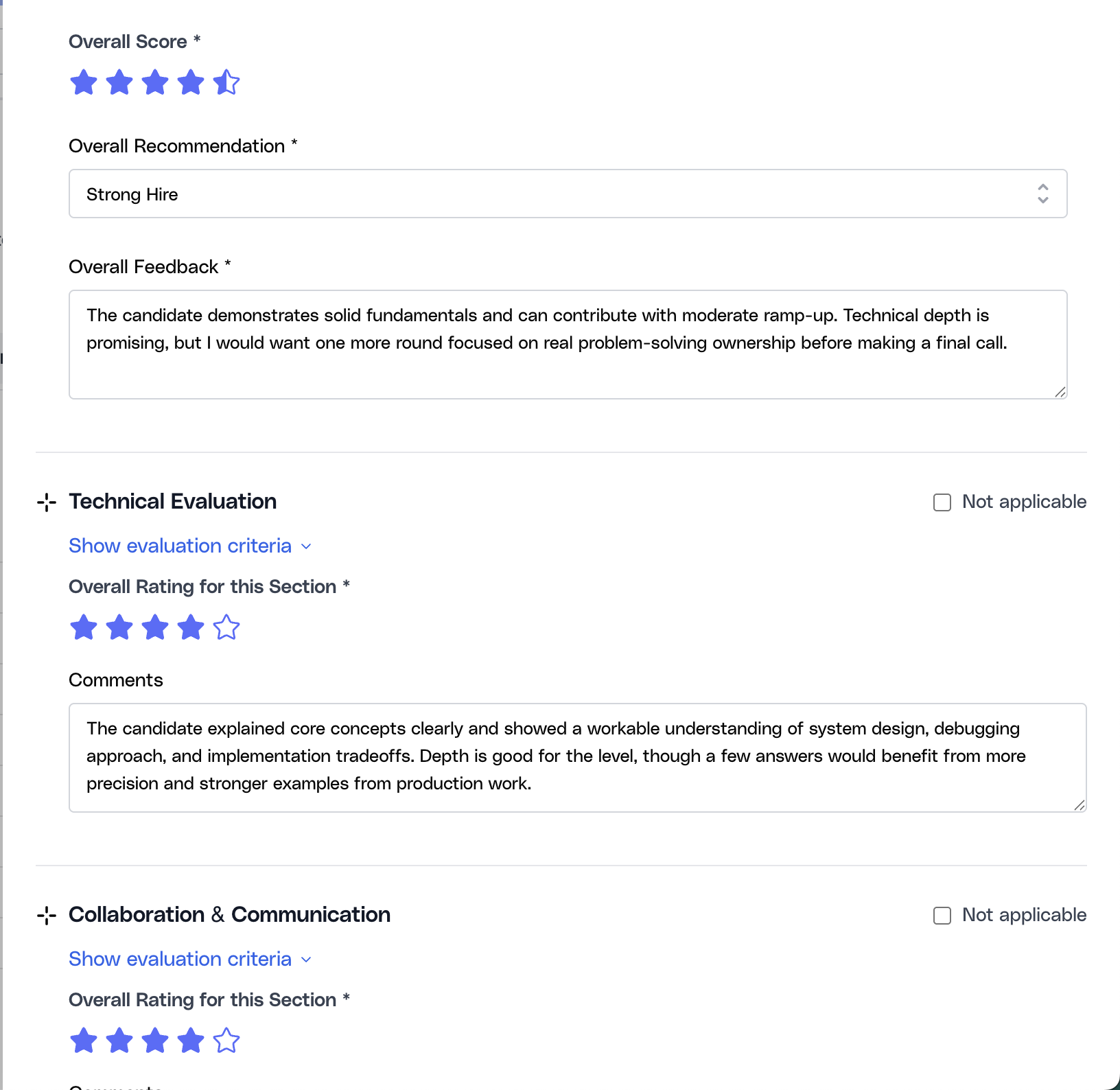
The form autosaves a local browser draft while the interviewer types. That helps prevent lost work, but the official record is only created after the user submits successfully.
Score each evaluation section consistently
Below the summary block, Ovii expects section-level evidence. Each section represents a competency area the hiring team has decided matters for this role. The interviewer can expand the evaluation criteria, give a star rating for that section, mark it not applicable, and add comments that explain what they observed.
This is where the module becomes more useful than generic notes. Section-level scoring makes it possible to compare interviewers on the same dimensions, see whether the candidate is strong in some areas but weak in others, and avoid reducing the entire interview to one vague paragraph.
- Show evaluation criteria when needed: Criteria chips make it clear what evidence the section is meant to capture, which helps interviewers stay aligned with the intended rubric.
- Use Not applicable sparingly: This exists for cases where a section truly was not part of the interview. It should not become the default way to skip difficult evaluation areas.
- Rate the section separately from the overall interview: A candidate can still be uneven. Strong technical depth with weaker collaboration signals, for example, is easier to explain when the form preserves sectional judgment.
- Write evidence-based comments: Good comments describe what the candidate demonstrated, what was unclear, and why the section rating was earned.
Use private notes with the right visibility controls
Private notes are not the same as overall feedback. They exist for information that should stay on the recruiter side of the process, such as compensation concerns, internal coordination risks, escalation context, or sensitive interview observations that are not meant to be broadly visible.
Privileged users can choose the visibility scope for private notes. Non-privileged interviewers do not get to widen that audience; their notes are restricted to HR-only handling by design.
- HR only: The most restrictive mode, intended for sensitive internal handling.
- HR + Org Admin / HR + Admin + Lead: Broader internal visibility for cases where senior decision-makers need the note for coordination.
- Custom viewers: A curated list of allowed viewers when a note should be shared deliberately rather than broadly.
- Non-privileged interviewers default to HR only: The backend normalizes their visibility so private commentary cannot be broadened casually.
Set private-note visibility before submitting sensitive context
Use HR only for tightly restricted notes, widen visibility only when there is a genuine coordination need, and use Custom when a small group should review the note without exposing it to the broader panel.
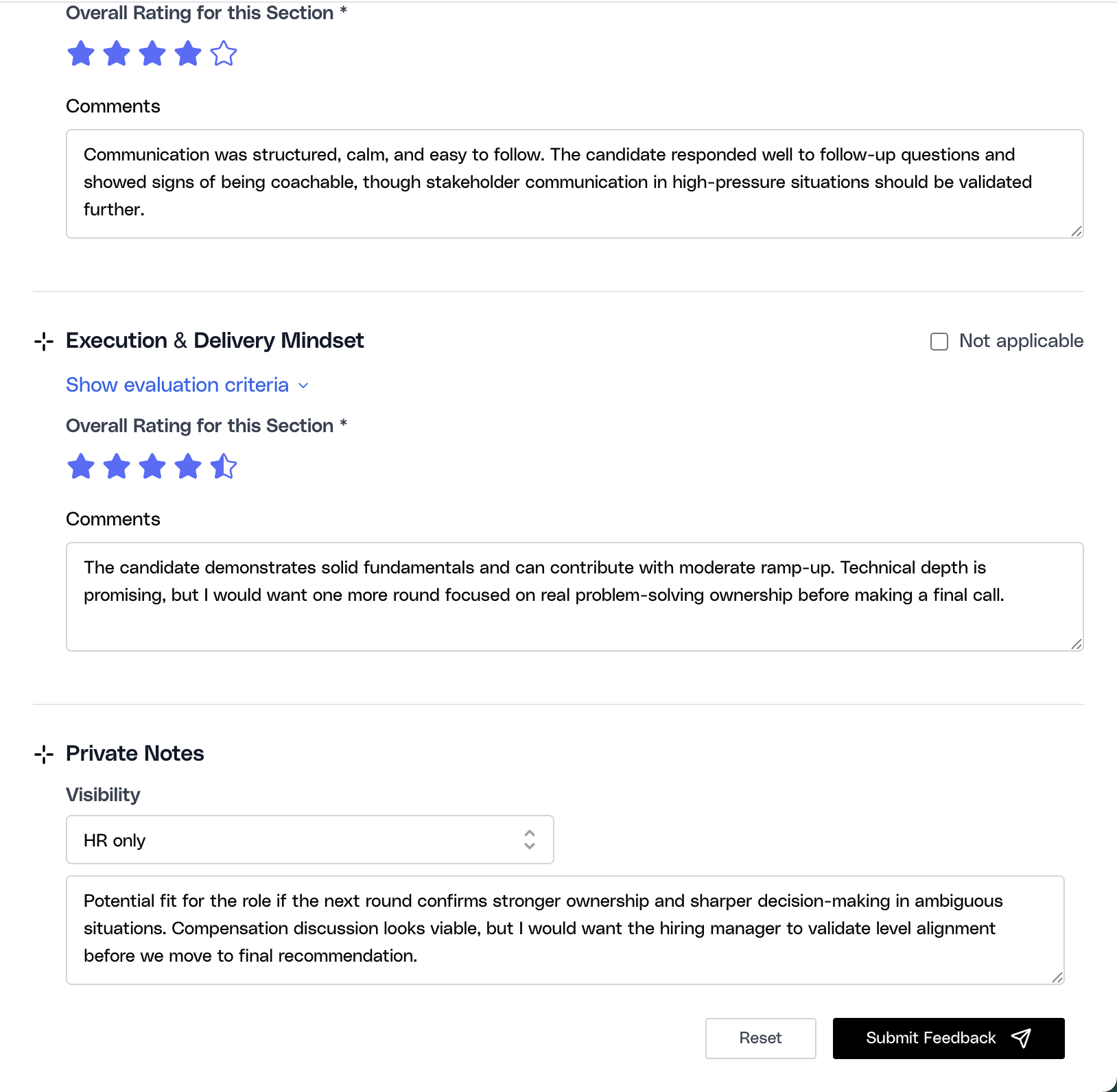
Handle stage context and late feedback correctly
Feedback in Ovii is stage-aware. An interviewer is expected to submit against the stage they were assigned to, even if the candidate has already moved forward. That is important because enterprise panels do not always submit at the same pace, and the system needs to preserve which round the evidence belongs to.
The recruiter-facing feedback surface also supports stage coordination. Privileged users can change the round, assign interviewers by email, and keep assignments aligned with the actual round being run. Automated stages such as Assessment and Async Video are treated differently because those stages do not use manual interviewer feedback.
- One submission per interviewer per stage: The backend blocks duplicate feedback from the same interviewer for the same round, which keeps the record clean and auditable.
- Late feedback is still valid for the assigned stage: If an interviewer was assigned to an earlier stage and the candidate has moved on, the system can still accept that stage’s feedback without pretending it belongs to the new stage.
- Manual feedback is disabled for automated stages: Assessment and Async Video results are reviewed in their own tabs, so the feedback form intentionally does not act as a substitute for those evaluation surfaces.
- Interviewer assignment can happen from the feedback surface: Recruiters can use the same workspace to align stage ownership and evaluation capture instead of switching tools.
When feedback is submitted for a past assigned stage, Ovii records the evidence but does not treat it as a new stage transition. That prevents late panel input from silently rewriting current pipeline state.
Understand what happens after feedback is submitted
Submitting feedback creates the official interview record for that interviewer and round. It becomes available in the candidate’s feedback history, where reviewers can expand the entry to inspect overall rating, recommendation, section-by-section comments, and private notes if their visibility level allows it.
What does not happen automatically is just as important: the candidate is not auto-promoted merely because someone submitted a recommendation. Ovii keeps stage progression as a deliberate recruiter decision, which is safer when multiple panelists submit at different times or when recommendations conflict.
- The candidate record updates with structured evidence: Recruiters can review the submission later inside the candidate drawer instead of chasing notes elsewhere.
- Current-stage recommendation signals become visible: The candidate table can surface the first submitted recommendation for the current stage and detect disagreement when multiple interviewers recommend different outcomes.
- HR / Admin can override a recommendation later: The backend provides a controlled recommendation update path when a privileged user needs to resolve or unlock a decision.
- Private notes remain filtered: Even after submission, note visibility is still enforced per user and per feedback entry.
Operating guardrails for the feedback module
The feedback module works best when the team treats it as the source of truth for interview evidence rather than as a formality after the real decision has already been made elsewhere. The more disciplined the team is about using the structured form, the easier it becomes to compare candidates, justify decisions, and defend process quality later.
The biggest operational mistakes are usually procedural: interviewers are assigned informally, templates are changed too late, private notes are used for information that should have been part of the shared evaluation, or recommendations are mistaken for automatic workflow actions. The module is designed to prevent those errors, but only if the team uses it intentionally.
- Finalize the template before live interviewing starts: Changing the rubric after some candidates are already scored creates avoidable inconsistency.
- Use overall feedback for evaluative reasoning, not politics: The shared narrative should help the team make a decision, not hide important evidence in off-record channels.
- Reserve private notes for genuinely restricted context: If information should influence the hiring decision broadly, it usually belongs in the structured feedback, not only in a restricted note.
- Keep stage movement manual and intentional: A recommendation is a decision input, not a workflow shortcut. Recruiters should move candidates only when the panel evidence is sufficient.