Campus Recruitment
Copy Article URL
Campus recruitment in Ovii is a structured institution-distribution channel. Use it when a role should be shared with universities, colleges, bootcamps, or training partners through a governed promotion flow instead of broad public publishing.
How campus promotion works in Ovii
The campus promotion flow in Ovii is not a public job-board blast. It is an institution-targeting workflow designed for roles where educational pipeline, early-career filtering, or partner-program outreach matters enough to control which institutions see the job.
One important product detail is that Ovii uses a shared promotion engine for two related channels: Campus Hiring for universities and colleges, and Bootcamps & Training for bootcamps and online programs. They are configured separately in the UI, but they save through the same backend promotion model with different institution-type filters.
That matters operationally because recruiters can run both channels at the same time without one overwriting the other. Campus targeting stays tied to colleges and universities, while training-partner outreach stays tied to bootcamps and program partners.
- Campus Hiring: Targets institutions of type COLLEGE and UNIVERSITY and allows a recruiter to define explicit eligibility criteria for TPO review.
- Bootcamps & Training: Targets institutions of type BOOTCAMP and ONLINE_PROGRAM and focuses on fast partner distribution without a separate eligibility criteria text block.
- Save behavior: When a recruiter saves a new audience, Ovii replaces the existing promotions for that same audience type only. Saving campus selections does not remove bootcamp promotions, and saving bootcamp selections does not remove campus promotions.
Decide when to use campus hiring vs bootcamps
Use Campus Hiring when the role depends on structured academic pipelines, degree-based screening, graduation cohorts, or institution-specific placement relationships. This is the better fit for graduate hiring, internships, fresher programs, and entry pathways that require a Training and Placement Officer or campus admin to triage the role against student eligibility.
Use Bootcamps & Training when the role is more skills-led than degree-led. This works well when the company wants to reach learners coming through focused technical programs, job-ready online cohorts, reskilling academies, or partner-led skill pipelines.
This distinction is strategically useful. Universities and colleges are strongest when academic qualification and placement governance matter. Bootcamps are strongest when capability velocity, recent practical training, and fast industry transition matter more than formal campus process.
Do not treat these channels as interchangeable. A poorly targeted early-career role can generate volume without fit, while the right institution mix can dramatically reduce downstream screening noise.
Select universities and colleges
In the Campus Hiring card, recruiters choose one or more universities or colleges from the institution directory. This selection is the distribution control itself. The role is shared only with the institutions you choose, not with every academic partner in the system.
This is where targeting discipline matters. Choose institutions that actually map to the role geography, expected degree path, and experience level. A campus list should look intentional, not aspirational.
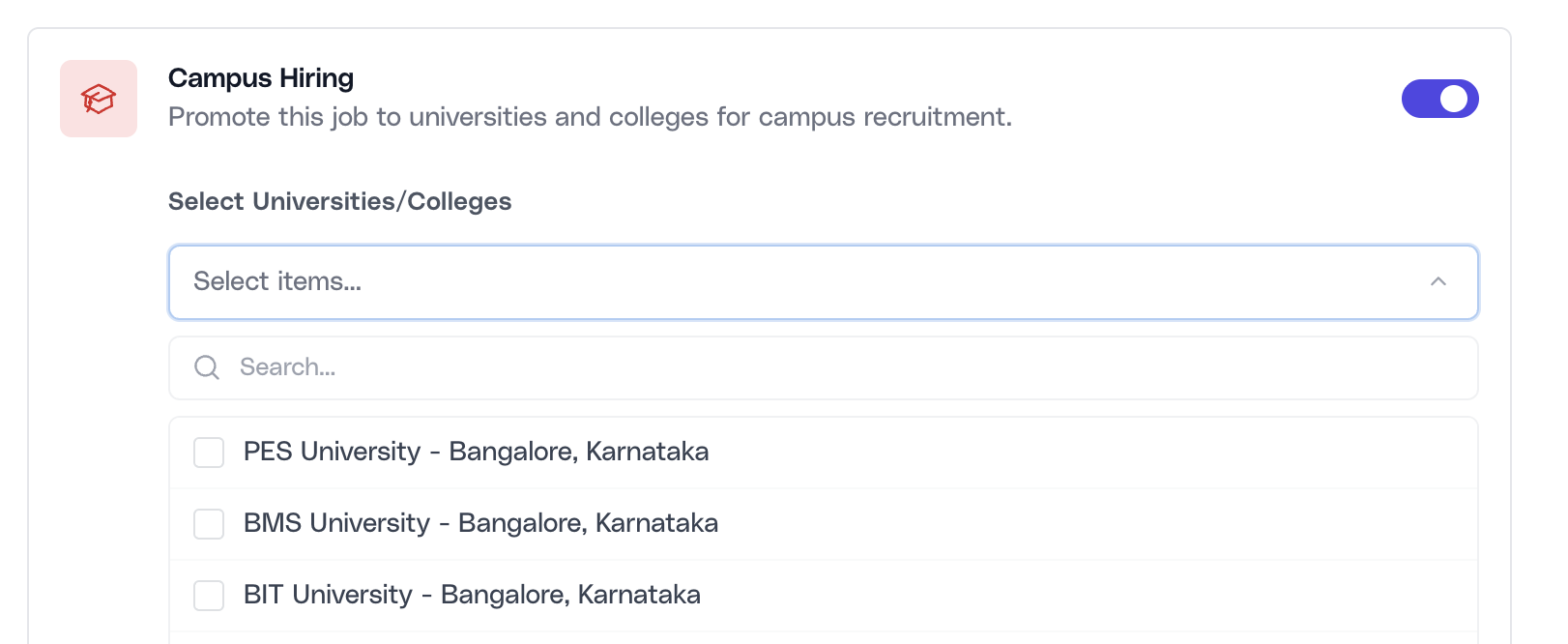
Open Campus Hiring and select the right institutions
Enable the Campus Hiring toggle, open the multi-select field, and choose the colleges and universities that should receive the role. The selection list is filtered to academic institution types only, which keeps this channel separate from bootcamp and online program outreach.
Define explicit eligibility criteria for TPO review
Campus Hiring includes a dedicated Eligibility Criteria for TPO field. This is one of the most important controls in the entire campus workflow because it turns the job from a generic open role into a filterable institutional brief.
The criteria are written for Training and Placement Officers, not for candidates. That means the content should be screening-operational: degree expectations, academic thresholds, discipline requirements, year or cohort rules, location assumptions, or any other conditions the institution needs before forwarding student profiles.
The reason this field exists is simple: campus distribution fails when institutions have to guess what eligible means. The more explicit the recruiter is here, the better the campus-side filtering becomes before profiles ever reach the recruiter queue.
- Good criteria: Specific, checkable, and aligned to the job. Examples include eligible branches, graduation windows, minimum academic thresholds, or internship-specific constraints.
- Weak criteria: Generic statements like “good communication skills” or “strong learner” that sound useful but do not help an institution filter submissions consistently.
Write criteria that help institutions pre-filter correctly
Use the Eligibility Criteria text area to specify what the TPO should check before submitting candidates. Strong examples include academic score thresholds, eligible graduation years, accepted branches, degree families, or other must-have conditions that materially affect who should be forwarded into the hiring process.
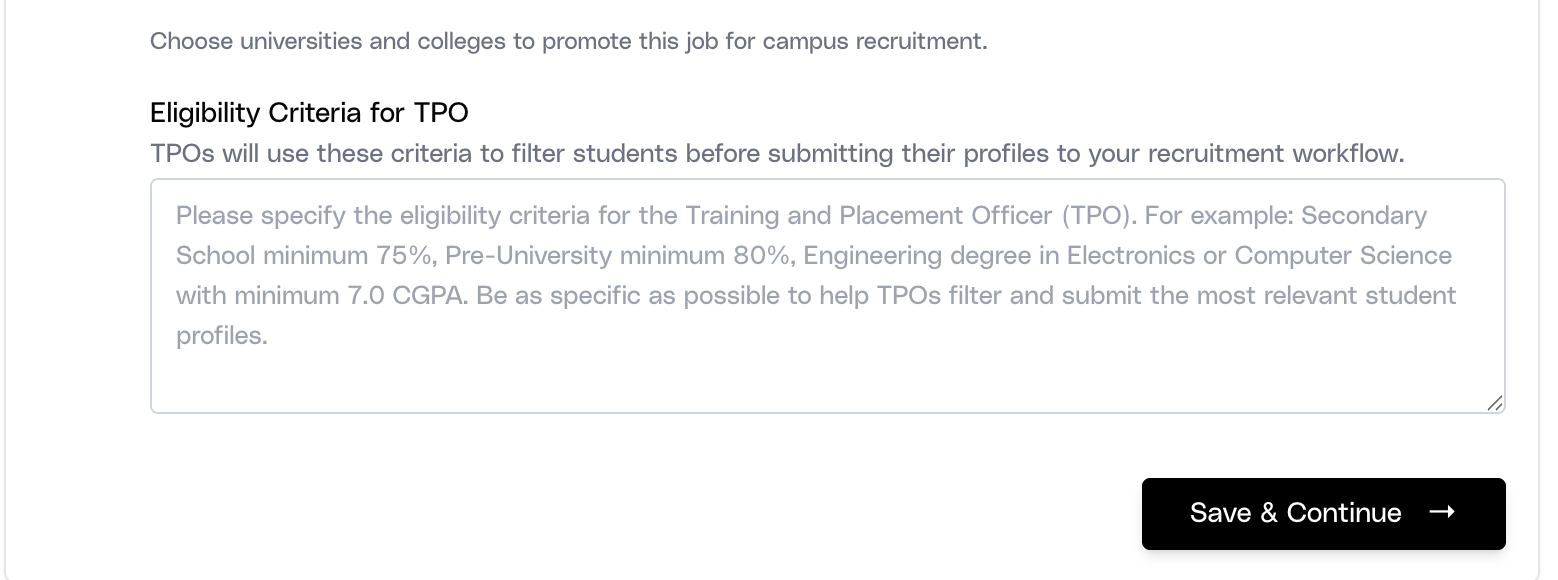
Bootcamps & Training does not use this criteria field in the current product flow. That is intentional: the campus/TPO path is designed for institution-side academic filtering, while training-partner promotion is kept lighter and faster.
Promote to bootcamps and training programs
The Bootcamps & Training card is the parallel channel for non-traditional or skills-first institutions. Recruiters choose bootcamps and training programs from a separate list and save the promotion without an additional TPO eligibility block.
This lighter setup reflects the difference in channel behavior. Bootcamp distribution is usually more immediate and less institution-governed than classic campus hiring, so the recruiter’s main responsibility is choosing the right partner set rather than drafting academic screening logic.
Use this channel when the role values applied skill readiness, recent project-based training, or alternative pathways into employment. It is especially useful for technical hiring where capability may come from structured training programs rather than a traditional campus pipeline.
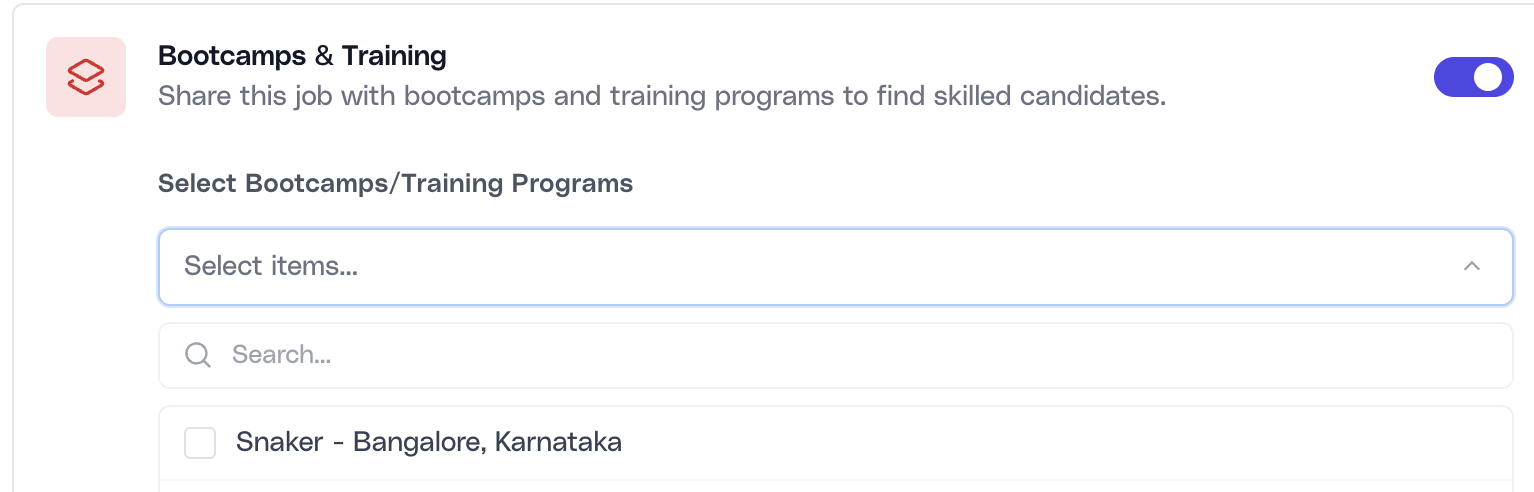
Select the right bootcamp and training partners
Enable the Bootcamps & Training toggle, choose one or more programs from the training-partner list, and save the selection. Ovii stores these promotions separately from campus promotions by using bootcamp- and online-program institution types behind the scenes.
Manage and review institution promotions
When a job is reopened, Ovii reloads the saved campus and training promotions and restores the corresponding toggles and selected institutions. This is important for operational continuity because recruiters can return to a role and understand its current institution distribution without reconstructing it manually.
Turning a toggle off deactivates only that audience type. Disabling Campus Hiring removes active college and university promotions for the job. Disabling Bootcamps & Training removes only bootcamp and online-program promotions. This separation protects one distribution path from accidentally clearing the other.
Recruiters should review these promotions based on applicant quality, submission relevance, and downstream conversion rather than sheer volume. The channel is working when institutions send candidates that are pre-filtered, stage-ready, and genuinely matched to the role profile.
- Review targeting quality: Ask whether the institutions chosen are producing the right academic or skills profile, not simply whether they are producing traffic.
- Adjust audience intentionally: If the wrong profiles are arriving, revise the institution list or the TPO criteria before scaling further outreach.
- Use both channels when justified: Some roles benefit from a split strategy: academic pipeline through campuses and applied-skills pipeline through bootcamps.