Automation & Workflows
Copy Article URL
Use Automation to apply repeatable hiring decisions without turning the candidate pipeline into a black box. Ovii’s automation layer is designed for high-confidence operating rules: threshold-based invitations, controlled rejection flows, and forward-only movement into the next qualified stage.
What challenges automation solves
Automation exists for one specific reason: some recruiting decisions are repetitive enough that the team should not have to restate them manually for every candidate. When the same threshold or next-step rule is applied over and over, human effort is better used on judgment, not repetition.
In practice, automation helps teams solve three operational problems at once. It reduces queue handling time, enforces consistency across recruiters, and prevents late or forgotten follow-up actions once candidates hit a known threshold. The feature is intentionally job-scoped so every role can have its own decision logic without forcing the same automation onto unrelated hiring motions.
- Reduce repetitive recruiter handling: If a role always sends an assessment above a certain match score or always rejects very weak fits, automation removes the need to repeat that decision candidate by candidate.
- Keep candidate treatment consistent: Rules apply the same logic every time, which helps prevent drift between recruiters, time zones, or hiring bursts.
- Trigger the next action at the right moment: Assessment invites, async video invites, rejection handling, and stage transitions can all be driven from the same rule framework instead of scattered manual follow-up.
- Preserve governance while moving faster: Ovii keeps automation tied to approved pipeline design, configured job assets, and auditable rule records rather than hidden shortcuts.
Understand the current automation model in Ovii
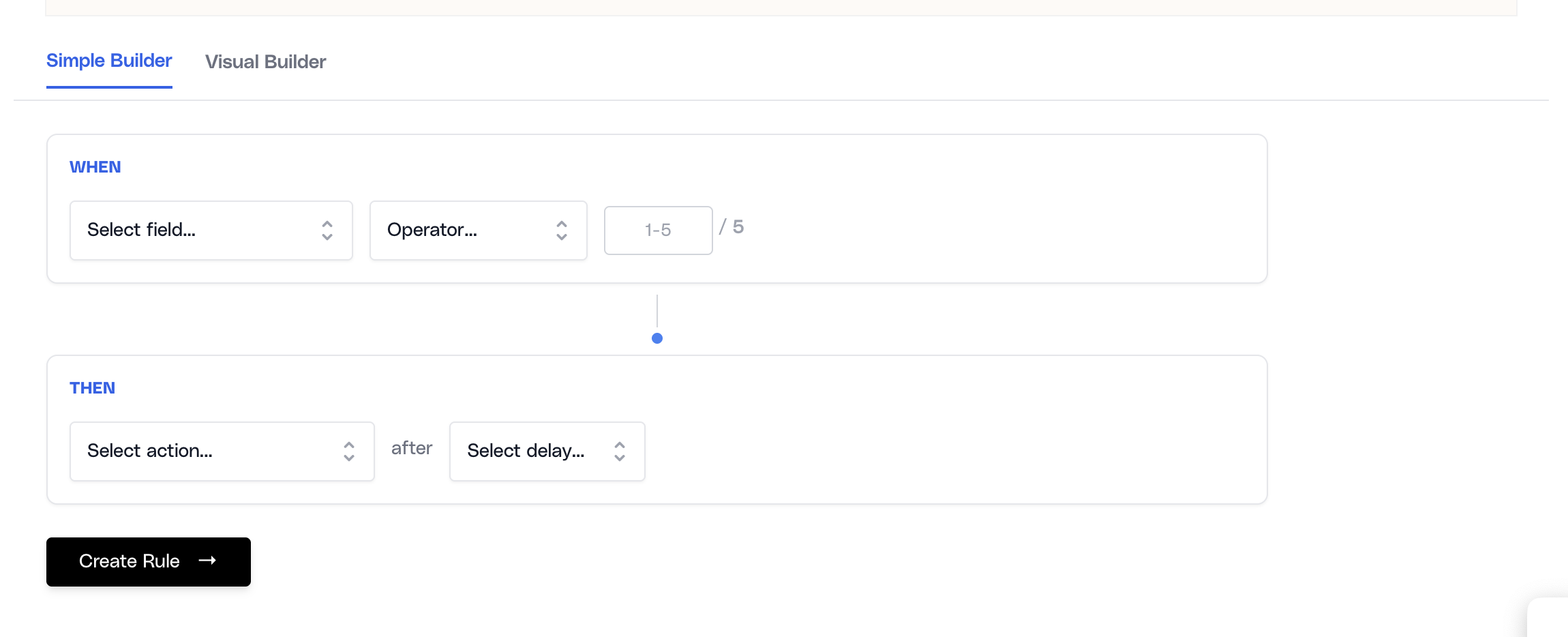
The current recruiter-facing automation surface is score-led. That means you define a candidate signal, compare it against a threshold, and tell Ovii what to do next. In the Simple Builder, rules are structured as `When` a score meets a condition, `Then` perform an action after a selected delay.
The available trigger fields are intentionally narrow. Resume Match Score is always available. Assessment Score and Async Video Score only become available when those stages are active in the pipeline. This keeps recruiters from building automation against signals that the job cannot actually produce.
The rule actions are also intentionally constrained to real operating outcomes: send a rejection email, send an assessment invitation, send an async video invitation, or move the candidate to another stage. This is a deliberate product choice. The point is not infinite automation flexibility. The point is dependable hiring operations.
The underlying workflow engine also supports stage-entry triggers, but the current recruiter builders in this tab are designed primarily around score-based rule creation. That keeps the day-to-day configuration surface simpler and easier to govern.
Prepare the job before you build rules
Automation is intentionally not the first thing you configure on a job. Ovii requires the pipeline and feedback form to be approved before the builder becomes fully usable, because automation should operate on a stable hiring design rather than on half-finished workflow definitions.
There is an additional readiness check for assessment and async video paths. If your pipeline includes Assessment or Async Video, but the job has no questions configured for that channel, the automation builder blocks the affected rules. This prevents a rule from sending candidates into a stage that has no real content behind it.
- Pipeline approval is required first: Automation depends on a stable stage structure, especially for move-to-stage actions and stage-sensitive candidate handling.
- Feedback approval is required next: Ovii treats automation as part of the operational workflow, so the evaluation model should be settled before candidate movement starts accelerating.
- Assessment and Async Video need configured questions: A rule cannot safely invite or move candidates into those stages unless the actual job content is ready.
- Subscription access still applies: The backend enforces Automation as a premium feature, and related invitation actions also respect feature entitlements and capacity checks.
Create rules in the Simple Builder
The Simple Builder is the most direct way to create operational rules. It presents automation in a compact sentence form: choose the score signal, choose the comparison operator, enter the threshold, choose the action, and define the delay.
This design matters because recruiters usually think in hiring policy statements, not in programming constructs. A good automation rule should read like a sentence the team could defend out loud. For example: if Resume Match Score is greater than or equal to 75, send an assessment invitation after 2 days.
- Resume Match Score works best for top-of-funnel routing: Use it when the team is comfortable acting on resume relevance before assessments or interviews begin.
- Assessment Score is for post-test decisions: Use it only when the job already has real assessment content and you want the next step to depend on completed results.
- Async Video Score is for structured interview screening: Use it when the team trusts async video as a meaningful qualification signal for that role.
Build one high-confidence rule at a time
Start by choosing the score signal that should trigger action. Then set the threshold, select the action, and choose the delay window. Use this builder for rules the team can explain clearly, such as routing strong candidates to the next evaluation step or rejecting clear mismatches after a review buffer.
Choose actions and delays carefully
The action matters more than the trigger. The same score threshold can mean very different things depending on what the system does next. That is why action choice should reflect candidate experience, recruiter workflow, and the confidence level of the signal you are using.
Delay is equally important. Immediate automation is helpful when the action is low-risk and expected, but some teams intentionally delay messages so a recruiter can sanity-check edge cases before the scheduled communication goes out. Ovii supports a test delay and a range of day-based delays for exactly this reason.
- Send Rejection Email: Use only for truly low-fit conditions that the team is comfortable automating without manual review. This action also updates the job application to the rejected state.
- Send Assessment Invitation: Use when the job relies on an assessment as the next qualified screening step and the candidate has crossed a believable threshold.
- Send Async Video Invitation: Use when async video is part of the workflow and the team wants candidates to move into structured video screening automatically.
- Move to Stage: Use when the next pipeline position is operationally ready and the move is safe to make without manual intervention.
- Delay windows are policy choices: Ovii supports a test/immediate path and longer delays such as 2, 4, 6, 7, 14, and 30 days. Pick the delay that matches how quickly your team wants the system to act.
A delay value of 0 is treated as a test/immediate path. In the current system this is represented as a short test-style delay rather than a long waiting period.
Use the Visual Builder when the team needs a flow view
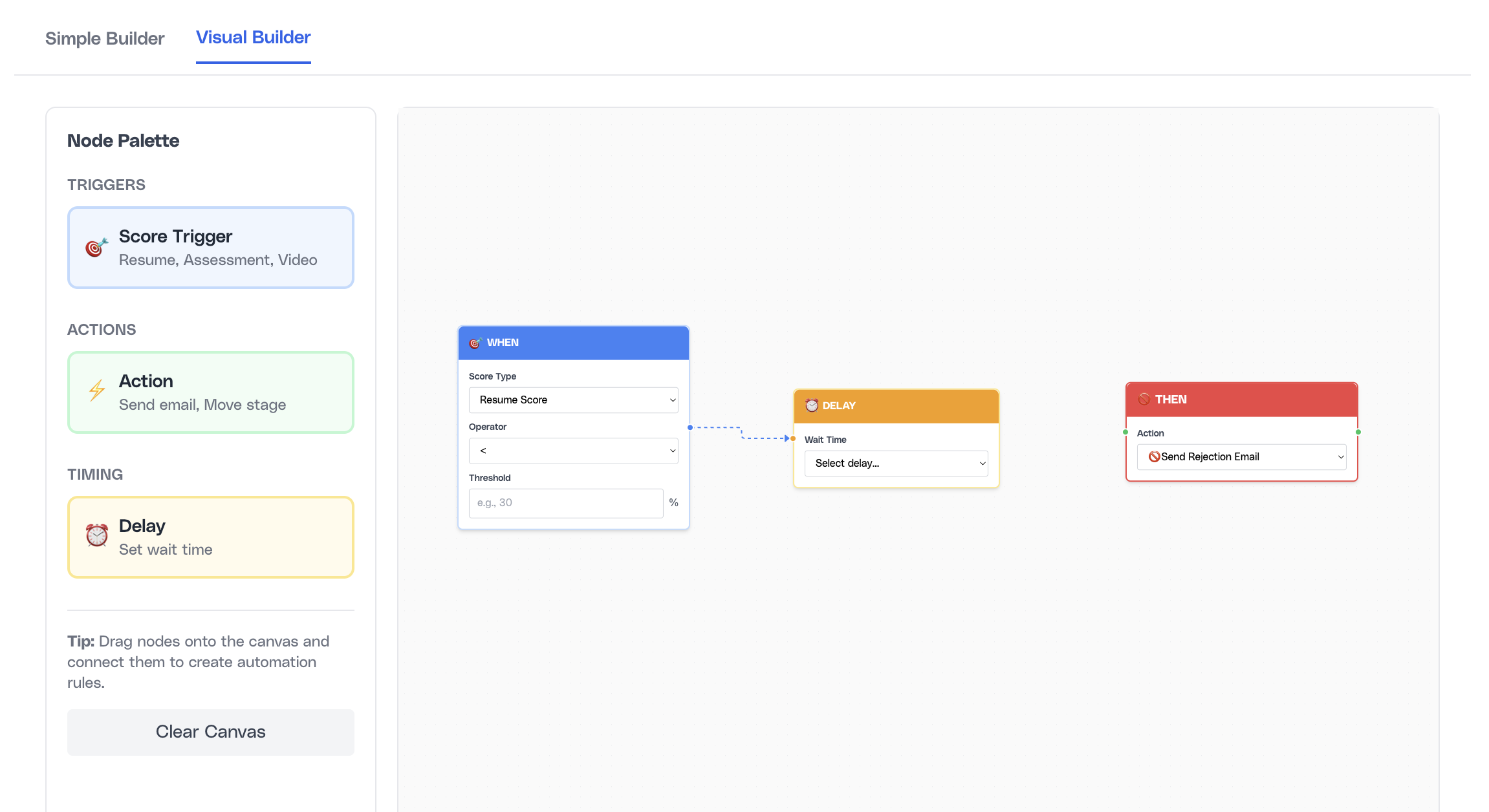
The Visual Builder presents the same logic in a node-based canvas. Recruiters can drag trigger, action, and delay nodes onto the canvas, connect them, and save them as workflow rules. This is useful when the team understands the automation policy better as a flow than as a sentence.
Even so, the visual builder is not a separate execution engine. It saves into the same workflow-rule model used by the simple builder. That means the same validations and backend guardrails still apply.
- Every valid flow still needs trigger, action, and delay: Disconnected nodes or incomplete chains are rejected before save.
- Existing saved rules can be visualized: The canvas can reflect existing automation so teams can understand what is already live before adding more.
Map the rule visually before saving it
Use the canvas to model a clear trigger → action → delay chain. This mode is especially helpful when recruiters want to explain automation behavior in workshops or during implementation reviews, because the flow shape is easier to discuss than a dense rule table.
Understand when rules run
Automation is not limited to future candidates only. When a new rule is created, the backend immediately evaluates eligible candidates already attached to that job. That is an important enterprise behavior because it prevents recruiters from assuming automation only applies prospectively.
The engine also checks new candidates against existing active rules. For delayed email actions, the actual send is handled by the scheduled workflow processor. For immediate non-email actions such as stage movement, the action can be executed directly when the condition is met.
This matters operationally because automation in Ovii is not only event-driven. It is also reconciliation-driven. The system actively tries to catch candidates or rules that may have been missed earlier, which makes the automation layer more resilient than a one-time trigger model.
- New rule, existing candidates: Creating a rule immediately checks current candidates on that job and can schedule or execute actions for matches.
- New candidate, existing rules: Candidates added later are checked against active rules for that job so the rule set remains continuously relevant.
- Delayed email actions are scheduled: Assessment, rejection, and async video emails are handed to the scheduled processor instead of forcing all communication at save time.
- Stage-entry events can also fire workflow logic: When a candidate enters a stage, the workflow engine can evaluate stage-based rules and execute follow-on actions tied to that stage entry.
Know the guardrails before you scale automation
Ovii deliberately restricts automation in places where candidate harm, reporting drift, or workflow contradictions would otherwise become easy. These constraints are not product rough edges. They are governance controls.
The most important principle is that automation should be fast, but it should also remain explainable. If a recruiter cannot describe why a rule exists, when it fires, and how it can be audited, that rule is not mature enough for production use.
- Duplicate and conflicting rules are blocked: The UI and backend both prevent overlapping logic that would cause the same candidates to receive contradictory actions.
- Forward-only movement is enforced: Move-to-stage automation is designed for progression, not for silently sending candidates backward through the pipeline.
- Question-dependent actions are validated: Assessment and async video automation cannot be created when the job lacks the required question set.
- Advanced candidates are protected from redundant invitations: For example, async video invitation logic skips candidates who are already past that stage or already have a valid session.
- Rule execution is auditable: Creation and deletion are logged, and execution history is retained so the team can inspect what happened and why.
- Start small and expand only after observing behavior: A few reliable rules are far more valuable than a large automation library nobody fully trusts.